WillowTab
| Languages: English | 简体中文 |
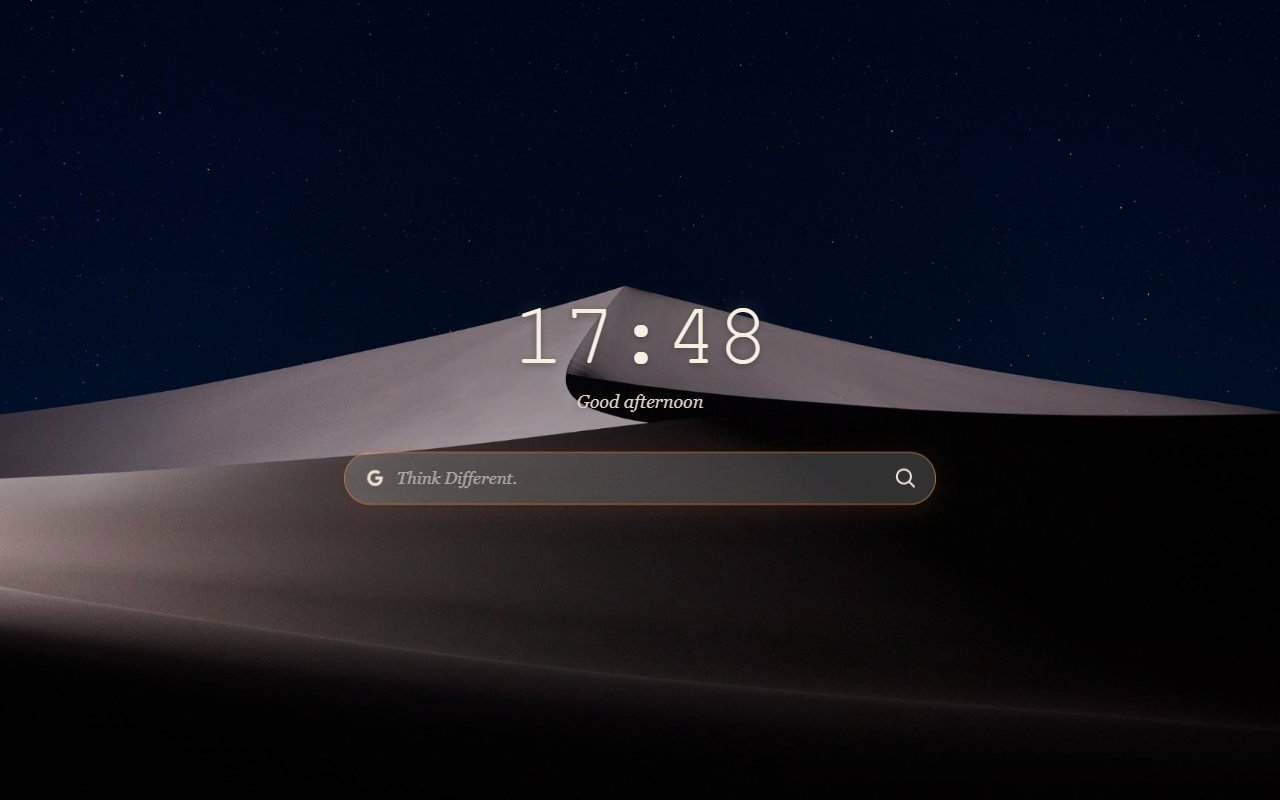
WillowTab is a clean and elegant new tab extension for Chromium-based browsers. It provides a focused search entry, multi-engine search switching, light and dark themes, and personal appearance settings so every new tab feels quieter and more comfortable.
Key Features
Clean Search Entry and Multi-Engine Switching
Use the centered search box to start searching quickly. WillowTab supports Google, Baidu, Bing, and DuckDuckGo, so you can choose the engine that fits your habits. You can also enable search suggestions to make keyword entry smoother.
Personal Backgrounds
Use a solid color background or local images, manage multiple wallpapers, and switch them manually or automatically. Solid color mode offers several soft presets and can also be adjusted manually. The search area adapts its accent color to the background; in wallpaper mode, WillowTab adapts text, controls, and the search surface to the selected image.
Light and Dark Themes
Choose light mode, dark mode, or follow the system appearance so the page stays comfortable across different times of day and usage environments.
Appearance Customization
Adjust fonts, corner radius, shadow strength, settings button placement, and the browser tab title so the interface better matches your habits.
Privacy-Friendly
WillowTab does not collect, track, or sell personal data.
WillowTab is for people who want a new tab page that stays simple, beautiful, and efficient without adding distracting information.
Technical Implementation
Adaptive Color and Rendered-Surface Analysis
WillowTab treats contrast as a semantic-role and final-rendered-surface problem rather than switching between one fixed light color and one fixed dark color.
flowchart TD
    A["Background and presentation state"] --> B{"Background mode"}
    B -->|Solid color| C["color.js<br/>OKLCH palette generation"]
    C --> D["Surface range<br/>Canvas, gradients, input and hover"]
    B -->|Wallpaper| E["wallpaper-color.js<br/>Actual cover crop at viewport and DPR"]
    E --> F["Final surface composition<br/>Overlay, readability, glass blur and SVG masks"]
    D --> G["Role-specific contrast solver"]
    F --> G
    H["Targets by role and mode<br/><br/>Dark theme<br/>Clock and input text: 9.0:1<br/>Search icons and engine-menu text: 7.0:1<br/><br/>Light, solid and wallpaper modes<br/>Clock and search controls: 6.0:1"] --> G
    G --> I["Semantic CSS variables"]
    I --> J["Clock, text and search controls"]
    K["Versioned cache keys and generation tokens"] -. Guard asynchronous analysis .-> E
css/style.cssexposes semantic tokens for canvas text, search surfaces and controls, panels, accents, danger states, and wallpaper glass. Components consume these roles instead of sharing raw light/dark color values. The fixed dark theme uses stronger role-specific targets than the light theme:9.0:1for the clock and search input text,7.0:1for the two search icons and engine-menu text,5.0:1for the greeting, and3.8:1for the decorative motto. The input text has its own semantic token so raising its contrast does not also brighten the placeholder, motto, search suggestions, or other secondary copy.js/color.jsgenerates solid-background palettes in OKLCH and evaluates each role against every surface it may occupy, including the base canvas, gradient endpoints, input surfaces, and selected or hover states. Body and search text plus search controls use separate targets; custom solid colors target4.5:1for ordinary text and6.0:1for the clock and two search icons. The solver tightens successful colors toward the limiting surface so they remain warm rather than jumping directly to pure black or white. Custom solid colors are limited to OKLCH lightness0.32–1.00and chroma0–0.14; previously saved out-of-range colors are projected to the nearest safe value on load. Chromatic backgrounds choose a search accent from the background hue and its±25°neighbors, while low-chroma backgrounds retain the warm brand accent; the settings panel and search area use separatebrandAccentandsearchAccentroles.js/wallpaper-color.jssamples the actualcovercrop at the current viewport and DPR, composites the global overlay and readability layer, reproduces the glass blur, and masks the exact SVG control shapes. The control solver first tries one warm candidate for each icon region, then uses the candidate that maximizes the lower of the two final-surface contrast values. The engine and submit icons therefore stay exactly the same color in each normal/hover state. Their wallpaper target is6.0:1; when a mixed surface makes that impossible, diagnostics record the best attainable shared result.- Wallpaper analysis cache keys include the image, viewport, overlay, readability settings, blur, solver version, and element geometry.
js/settings.jsalso uses generation tokens so an older asynchronous analysis cannot overwrite a newer wallpaper or resized viewport result. scripts/validate-colors.jschecks a 4,096-color RGB grid, 12 representative colors, fixed theme roles, light/dark/split/high-complexity wallpaper surfaces, strict shared-color controls, maximin candidate selection, best-effort diagnostics, deterministic safe-gamut projection, neighboring-hue search accents, soft presets, and one-step color boundaries.
Install
Microsoft Edge
Edge users should install WillowTab directly from Microsoft Edge Add-ons:
Install from Microsoft Edge Add-ons
Google Chrome
Google Chrome users should install WillowTab directly from the Chrome Web Store:
Other Chromium Browsers
For other Chromium-based browsers, install manually from GitHub Releases:
Download WillowTab-v1.7.6.zip, the generic build for Chromium-based browsers.
Manual installation steps:
- Download
WillowTab-v1.7.6.zip. - Extract it to a local folder.
- Open your browser’s extension management page, such as
chrome://extensions. - Enable Developer mode.
- Click “Load unpacked” and select the extracted folder.
Chrome Web Store Package
WillowTab-for-Chrome-v1.7.6.zip is a dedicated Chrome Web Store build for Google compliance. It is mainly intended for Chrome Web Store submission and review.
Project Structure
WillowTab/
├── manifest.json
├── newtab.html
├── privacy-policy.html
├── css/
│   └── style.css
├── js/
│   ├── i18n.js
│   ├── search.js
│   ├── clock.js
│   ├── settings.js
│   └── theme.js
├── icons/
└── chrome-store/
The Chrome Web Store build lives in chrome-store/. Its policy-specific override files include manifest.json, newtab.html, js/search.js, js/settings.js, js/i18n.js, privacy-policy.html, and README.md.
Privacy, Security, and Contributing
License
Think Different.